Short answer
What matters most
Always honor a clear request for a person. Also transfer cases that hit a policy or identity boundary, or a supported lookup that fails after a defined recovery. Send the customer’s goal, what was checked, the transfer reason, and a safe case reference to a staffed destination. Treat it as complete only when the channel confirms acceptance; otherwise give a real fallback. Use the platform’s native handoff if it covers these steps.
Treat handoff as a confirmed workflow
Imagine a customer asking whether a damaged item can be returned after the normal window. An assistant repeats the general policy, but the customer needs someone to review an exception. If the assistant keeps trying the same answer, the business has automated the conversation without giving the customer a path to resolution.
A handoff is four connected steps: decide when to stop, prepare a useful case note, send it to a real destination, and tell the customer what happened. The workflow below separates those steps so a team can test each one.
Use the reading guide to jump to the trigger policy, context packet, worked example, acceptance brief, or native-platform boundary.
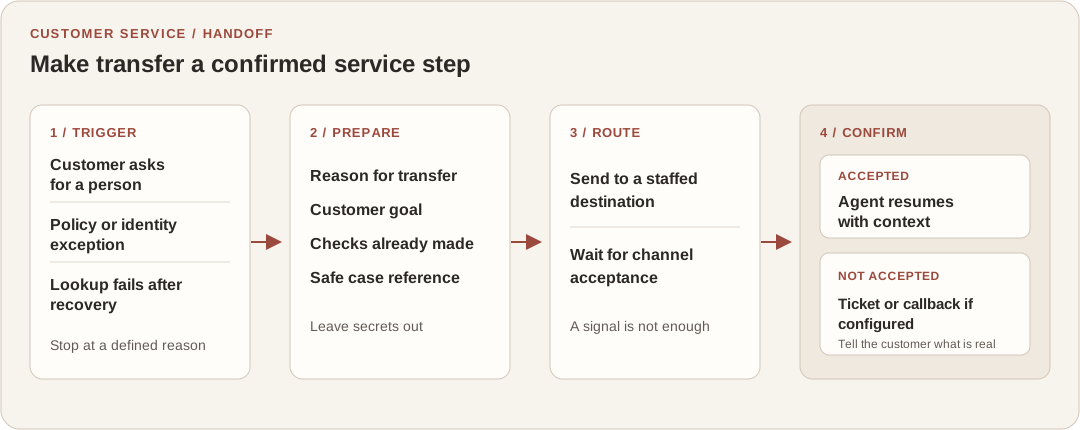
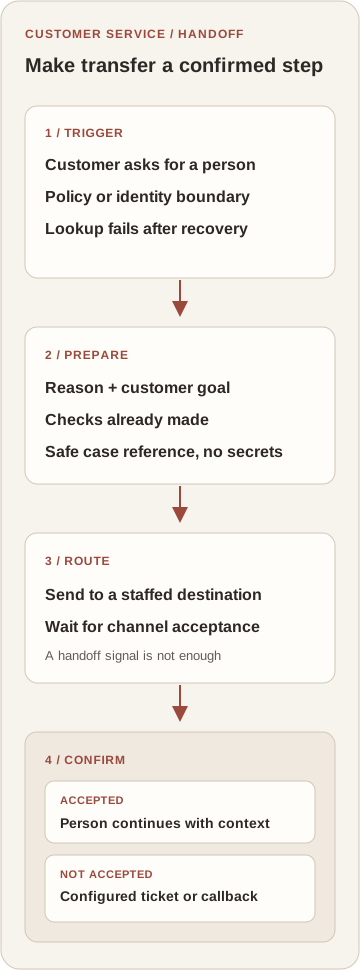
Set transfer triggers before tuning the prompt
Write the trigger policy with the service owner, then configure the assistant. A customer’s direct request for a person should stop self-service. Other triggers should come from the work: a case requires a policy exception, identity cannot be verified, a required system is unavailable, or a supported lookup still fails after the recovery steps you have chosen.
Treat an uncertain answer as a reason to check an approved source or route the case, not as permission to guess. Keep ordinary, supported questions in self-service. This policy is a recommendation for the workflow; the exact trigger names and controls depend on the product and channel you use.
On a small screen, scroll the table to read every column.
| Situation | Assistant action | What the person receives |
|---|---|---|
| Customer asks for a person | Stop self-service and start the configured route. | The customer’s goal and a short conversation summary. |
| Policy exception or identity boundary | Do not make the exception or continue an unverified account action. | The decision needed and which safe checks were completed. |
| A required lookup fails after recovery | Stop repeating the same call and hand off with the failure reason. | What was attempted, the system or source involved, and the result. |
| No agent accepts the transfer | Do not claim the customer is connected; use a configured ticket or callback path. | The fallback reference and only the next step the business can confirm. |
Pass the next action, not a transcript dump
Give the human enough context to continue without making them reconstruct the whole exchange. A useful packet names the customer’s goal, why the assistant stopped, what it checked or attempted, any safe record reference, and the next decision the person needs to make. Keep secrets, payment details, authentication codes, and unrelated conversation history out of the handoff unless the receiving system has a specific, approved need for them.
The receiving queue matters as much as the summary. Route exceptions to an available team with the right responsibility, and verify what the customer sees when a transfer is queued, declined, or unsupported in that channel. Do not let a generated message imply that a person has taken over before the channel confirms it.
Microsoft separates direct and configured escalation
For agents and flows using Copilot Studio’s standard harness, the docs cover both a customer asking for a person and a configured topic that transfers a conversation. Context can go to a connected engagement hub, but the live-agent path requires that hub and a transfer node; the default Escalate topic can instead show contact instructions.
Microsoft Learn: Hand off to a live agent (updated August 3, 2026)A handoff signal may not transfer a conversation
Dialogflow CX says its Live agent handoff response is a signal for the calling system and measurement; it does not change session state. The surrounding integration must perform the actual transfer, so test the customer’s channel end to end.
Google Cloud: Dialogflow CX fulfillments (updated October 7, 2026)Context can be an explicit part of routing
Amazon Connect’s agentic self-service example lets an Escalate tool return a reason and summary as session attributes. Configured contact-flow steps can then route on the selected tool and expose those fields to the agent workspace. This is a product-specific flow, not a universal handoff contract.
AWS: Use agentic self-service (checked October 10, 2026; no page update date shown)Walk through a hypothetical return exception
Consider a hypothetical retailer whose assistant can explain its published return policy and look up an order after the customer verifies their account. A customer says the item arrived damaged but is outside the usual return window. The assistant should stop before promising a refund or rejecting the request as final, then route the exception to the team that can decide it.
A concise handoff could say: “Reason: return-policy exception. Goal: review a damaged item. Checked: order reference verified; published return guidance checked. Action completed: no refund or return approval. Next decision: assess the exception. Reference: [case ID].” The example is a proposed message, not a client result. It carries the work forward without asking the agent to guess what the assistant did.
If the queue is unavailable, the same flow should say that the request was recorded only if it actually created a ticket, or offer a callback only if the business can schedule one. Otherwise, give the customer a verified contact route and explain that no transfer was completed.
Write a handoff acceptance brief
Before launch, review one brief with the customer-service owner, the person responsible for the agent channel, and the team that receives cases. Keep the test concrete enough that someone can run it and see whether the transfer really worked.
- Trigger: name the direct customer request, policy boundary, and recoverable system failures that should transfer.
- Allowed checks: record what the assistant may look up and which actions must stop for a person.
- Context packet: define the goal, reason, checks attempted, safe record reference, and next decision.
- Destination and confirmation: name the queue or service, how acceptance is detected, and who owns an unstaffed route.
- Fallback test: simulate a full queue or failed transfer and check that the customer gets only a confirmed ticket, callback, or contact option.
Use native routing when it completes the path
First check whether the customer-support platform already offers an escalation topic, transfer node, queue, and context fields for your channel. Use those controls when they pass the goal and reason, reach the right staffed destination, confirm acceptance, and have a real fallback. A custom adapter is justified only when you can name the missing integration or routing behavior and the platform cannot configure it safely.
The customer-assistant project in my selected work shows the kind of system where CRM context and human escalation belong in the same conversation flow. If you are defining that workflow or connecting it to the software your team already uses, see the relevant project and my AI engineering scope.