Short answer
What matters most
Run work on an event when waiting until the next planned window would make the result useless or harmful. Use a short-delay queue when it must move soon but can wait for controlled dispatch. Use a scheduled batch when work stays useful until a known cutoff. Set the deadline, duplicate behavior, queue owner, and fallback before automating.
Start with the latest useful result
An AI step can finish quickly and still miss the moment it matters. A dispatcher may need a changed pickup window before planning the next route; another team may care only that a group of routine records is ready before close. Both can use AI, but their operating clocks differ.
If every update launches the full workflow, quiet inputs can create unnecessary runs while a busy period can overwhelm a downstream review step. If every update waits for a schedule, an exception can sit until after someone needed it. Ask how late the result can arrive and still change a useful decision.
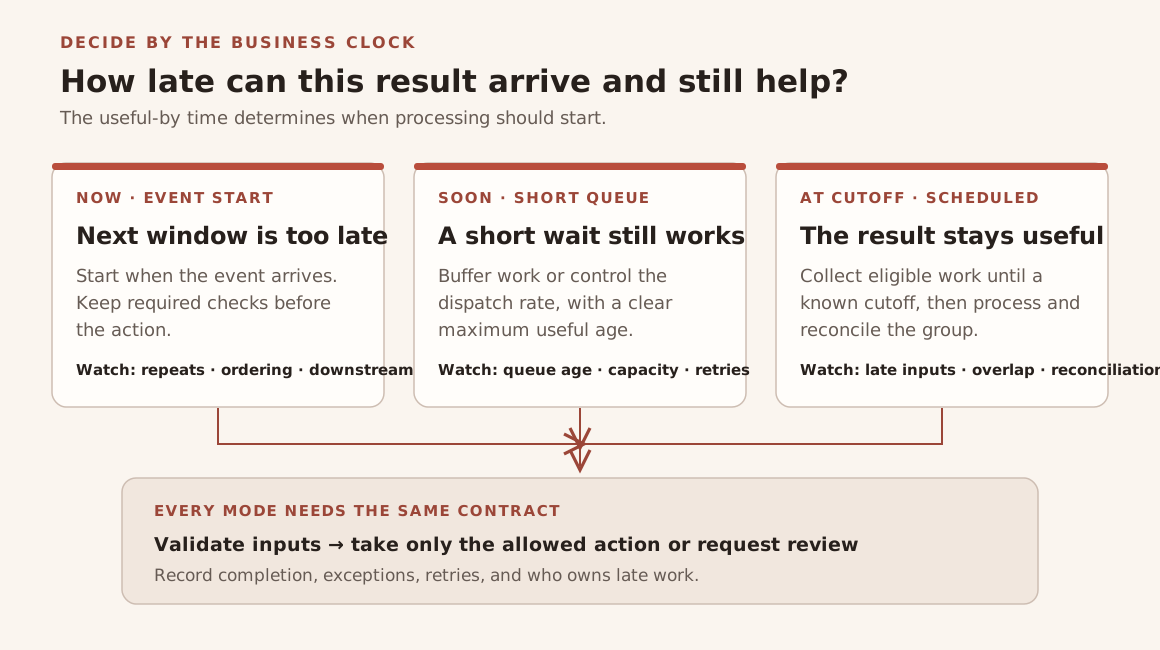
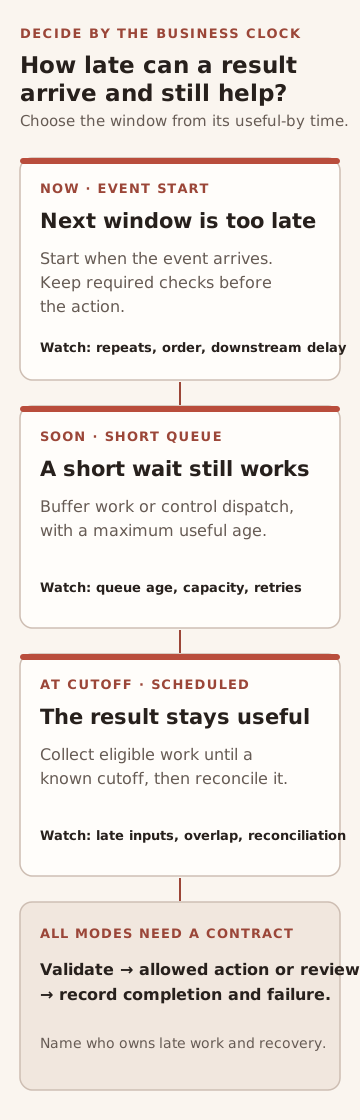
The diagram maps that deadline to an event start, a short queue, or a scheduled batch, then shows the controls shared by all three. These are design choices, not processing-time guarantees.
Use the business clock to choose a mode
An event-triggered workflow starts because something happened: a request arrived, a record changed, or a person submitted a form. Choose it when waiting for the next planned run would change an operational decision. Event-driven does not mean every downstream step completes synchronously; consumers can still process work asynchronously.
A short-delay queue separates receiving work from processing it. That can help when arrivals come in bursts or when a worker should control its dispatch rate. The queue still needs a maximum useful age: work waiting behind capacity can miss its business deadline.
A scheduled batch is a good fit when inputs stay useful until a known cutoff and the team can act on grouped results. A timer tells a system when to run; it does not, by itself, define which records belong in a batch or how late arrivals are reconciled.
Event-driven means responsive, not automatically instant
Microsoft's architecture guidance describes event delivery as near real time and consumers as able to respond when events occur. It also warns about eventual consistency, asynchronous error handling, and the overhead of brokers when a simple synchronous request already meets the requirement. Use this as an architecture trade-off, not a latency promise for a particular workflow.
Microsoft Learn: Event-driven architecture style (updated March 7, checked October 20, 2026)Queues can smooth bursts, but they add waiting
Microsoft's background-job guidance describes a queue as a way to buffer bursty demand so a worker can process it at a controlled rate. That is a capacity pattern, not proof that an item will finish by your deadline. Keep item age and the response when work waits too long visible to the workflow owner.
Microsoft Learn: Best practices for background jobs (updated March 31, checked October 20, 2026)A schedule and a queue have different semantics
Google documents Cloud Scheduler as a fixed recurring trigger and Cloud Tasks as individually configured tasks that can be scheduled or dispatched from a queue. Its retry behavior also differs by service. This is a product-specific example; it does not mean a timer automatically aggregates inputs into a batch.
Google Cloud: Compare Cloud Tasks to Cloud Scheduler (updated October 13, checked October 20, 2026)Walk through a hypothetical dispatch update
Imagine a trucking operations team receives pickup-window updates while a dispatcher is preparing a route plan. This scenario is hypothetical; I have not built or measured this AI workflow. Before the plan is committed, a change that affects a load assignment may need to start promptly, pass ordinary checks, and reach an operator for confirmation.
Routine confirmations that do not change a decision until the next planning cutoff could wait in a queue for a scheduled pass. If an update arrives after the cutoff, mark it as late and route it to the dispatcher instead of silently rolling it into tomorrow's work.
My logistics platform case study documents real-time updates for driver and dispatcher roles. It does not describe an AI workflow or the hypothetical batch design here; it shows the kind of operating product where timing is visible to users.
Design for repeated work and growing queues
Google's Cloud Tasks documentation says duplicate executions can occur despite its exactly-once goal, and that a target with insufficient capacity can build a backlog. Those are service-specific behaviors, not universal queue guarantees. The buyer implication is still concrete: make consequential writes safe to repeat and decide who sees work that is late or stuck.
Google Cloud: Cloud Tasks issues and limitations (updated October 13, checked October 20, 2026)Compare the run windows
Use this qualitative matrix to describe the operating contract before choosing a tool. It is not a product ranking or a measured latency comparison.
On a small screen, scroll the table to read every column.
| Run mode | Choose it when | Decide before release |
|---|---|---|
| Event start | Waiting for the next planned window would make the result too late. | Which event starts it, what checks must pass first, and how repeated or out-of-order events are handled. |
| Short-delay queue | Work must move soon, but can wait for available capacity or a brief buffer. | Maximum useful age, dispatch limits, retry behavior, and the owner for a growing or stuck queue. |
| Scheduled batch | Results stay useful until a known cutoff, and grouping them helps the operation. | Cutoff rule, late-input handling, overlapping runs, completion checks, and reconciliation owner. |
Write the timing contract before building
A short run brief makes a schedule testable and gives a simpler native workflow a fair chance. Fill it in with the process owner and the person who will handle exceptions:
- Useful-by time: when does the result stop changing a decision?
- Start rule: which event, queue condition, or scheduled cutoff starts work?
- Action boundary: what may the workflow change, and what needs approval?
- Repeat rule: how are retries, duplicates, and partial runs recognized?
- Late-work owner: who sees a missed deadline or a growing queue?
- Fallback: what manual path keeps the operation moving?
Keep the first design simple
Check the workflow tool your team already owns for event triggers, schedules, queue controls, and visible run status. If it meets the freshness deadline and recovery needs, use it. Add custom engineering only for a specific gap, such as an integration it cannot support, per-item recovery it cannot expose, or an action boundary it cannot represent.
For a build decision, I can map the event, deadline, destination, and fallback with your team, then scope the smallest system that meets them. Start with one process and its latest useful completion time; the right next step may be a native schedule, a controlled queue, or event-driven work.