Short answer
What matters most
Let AI propose a small, typed change; let your application choose the row and check the write. Resolve records by a trusted ID, allow only specific columns and accepted values, then write through the spreadsheet's native API. Use formulas or normal rules for fixed logic. Keep a person in the loop for ambiguous rows, formula or structure edits, and policy judgments.
Start with a proposal, not a cell address
Picture an operations lead asking an assistant to move a service request to “waiting on parts” and add a supplier note. The workbook is shared and contains identifiers, formulas, and fields other teams depend on. A natural-language request can describe the right change without uniquely identifying the row or the cells that may change.
The buyer question is how much authority to give an AI assistant that edits a shared spreadsheet. Treat its output as a proposed patch. Your application should select the workbook and record, validate the change, and make the final write.
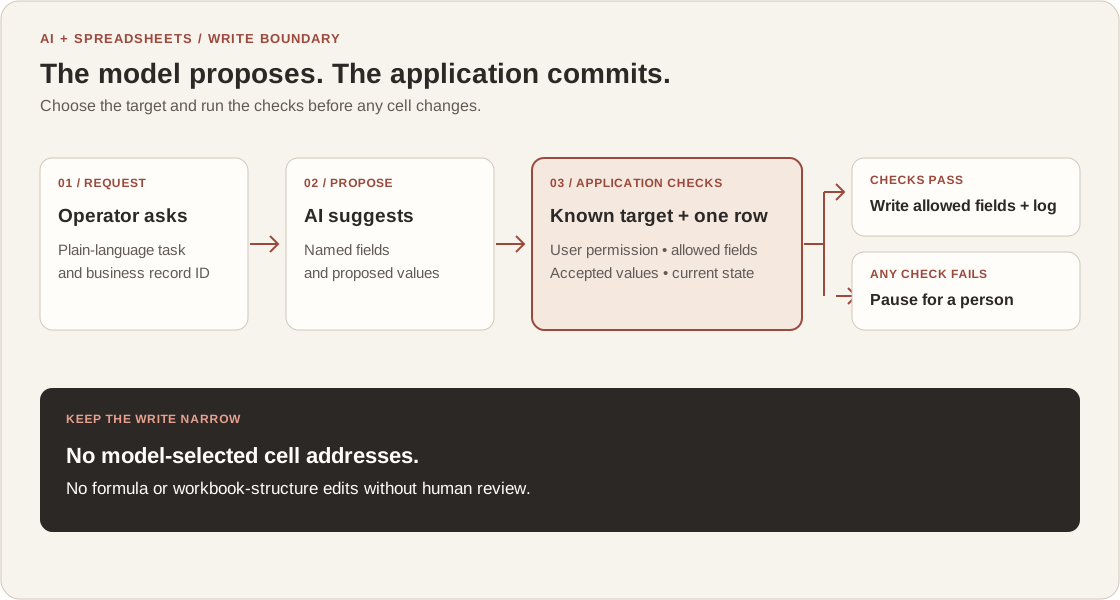
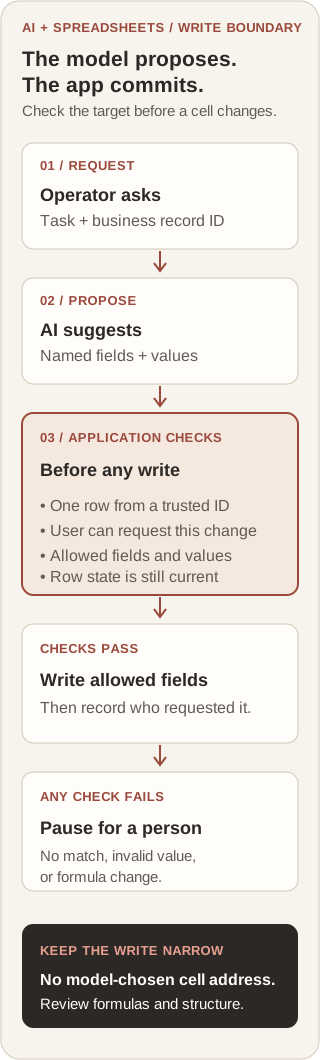
The flow below keeps those jobs separate. An AI may translate a request into a constrained update, but the system around it decides whether the target and fields are safe to change. Unclear targets and changes to formulas or structure stop for a person.
Use the guide to choose a write path, see the checks around a cell update, walk through a dispatch request, or prepare a small release brief.
Choose the write path by change type
Use the least complex path that meets the task. If the change follows a fixed calculation or rule, use a formula or spreadsheet validation. Add AI when the input needs interpretation, then keep the possible write small and explicit. A person should decide when the requested change alters the meaning or structure of the workbook.
On a small screen, scroll the table to read every column.
| Change request | Best first path | Write boundary |
|---|---|---|
| Fixed total, threshold, or status rule | Formula or normal spreadsheet rule | Keep the calculation deterministic; use AI to explain an exception if useful. |
| Plain-language update to a known record | AI proposal with a narrow write | Resolve the row by trusted ID; allow only named fields and values. |
| No unique record or conflicting instructions | Ask a person to clarify | Do not guess the row or silently choose between conflicting values. |
| Formula, layout, or workbook-structure change | Human review first | Show the proposed impact and get approval before changing the workbook. |
Put deterministic checks between the model and the cell
Give the model a task such as “propose a status and note for this request,” not a general-purpose instruction to edit a workbook. The application should already know which workbook and sheet the user is working with. Resolve a row using a stable business identifier or a user-confirmed selection; do not let generated row numbers or a fuzzy name match silently pick the target.
Before writing, check that the current user may request the change, that exactly one target record matches, that each field is on an allowlist, and that each value passes the business rule. Keep formula, identifier, and structure fields outside that allowlist. If another person has changed the row since it was read, recheck the current state or ask for review rather than applying a stale proposal.
A structured model response helps your code inspect the proposed fields, but it does not establish that the user is authorized or that the business change is correct. The write path should make those decisions from application data and configured rules.
A tool call is a request to your application
OpenAI's function-calling guide describes the application receiving the model's tool call and executing code on the application side. Use that point between proposal and execution for identity, permission, and business-rule checks.
OpenAI API: Function calling (checked October 13, 2026)Google Sheets scopes do not stop at a tab
Google documents that Sheets API authorization scopes apply to a spreadsheet file and cannot be limited to one sheet. If a workflow needs a narrower write boundary, enforce its allowed records and fields in the application as well.
Google Sheets API: Choose API scopes (updated September 3, 2026)An Excel range can include formulas
Microsoft Graph's range update supports values, formulas, and number formats in the same update. A broad write function can therefore expose more than ordinary text cells; constrain which fields and properties the application sends.
Microsoft Graph: Update range (updated August 1, 2024)Atomic batches do not freeze a shared sheet
Google Sheets applies valid batch subrequests together atomically, while its API documentation also says collaborator changes can affect what the spreadsheet reflects after the update. Recheck the row when concurrent edits can change the decision.
Google Sheets API: Batch requests (updated September 3, 2026)Walk through a hypothetical dispatch request
In a hypothetical service team, an operator asks to mark request SR-4821 as waiting on parts and record a supplier note. The application, not the model, looks up SR-4821 in the configured table and confirms there is one current record. The assistant returns a proposed status and note; it does not choose a cell coordinate.
The application checks that the status is one of the team's allowed values, the note fits the selected field, and the row is still eligible for that update. If those checks pass, the connected tool writes only the status and note, then records who requested the change and what was applied. A missing or duplicated ID, a closed request, or a request to edit a formula stops for clarification or review.
This scenario is hypothetical, not a client result. A connected spreadsheet API can still have product-specific authorization, collaboration, and update semantics. Test the actual workbook and user permissions; a successful API response alone does not prove that the right business record was changed.
Prepare a brief before enabling spreadsheet writes
Use this short brief with the workflow owner and the person responsible for the spreadsheet. It turns a general “AI can update the sheet” request into a boundary that can be reviewed and tested.
- Name the workbook, table, and trusted identifier used to select one record.
- List the fields the assistant may propose and the accepted values or validation rules for each.
- Name stop conditions: no match, multiple matches, stale row, invalid value, protected field, formula, or structural change.
- Test one valid edit and each stop condition; record the expected result and who can approve or reverse a change.
- Choose who owns access, the change log, and the decision to keep the workflow running after the first release.
Keep the native path until it has a real gap
If a formula, form, dropdown, or ordinary spreadsheet rule already handles the work, start there. A small integration is useful when the input is conversational but the destination needs a known row, field-level checks, or a traceable handoff that the native path does not provide. Custom engineering should close that named gap, not add a model to every spreadsheet task.
My spreadsheet and database automation case study covers a defined sync between Google Sheets and PostgreSQL; it is evidence of that data-sync work, not a result for AI-authored edits. If you are deciding whether a plain rule, a review step, or a connected AI workflow fits your process, bring one representative update to a conversation about your system.