Short answer
What matters most
For routine appointments with a defined service, duration, host, and availability, let the scheduling product own the booking and have the assistant share its booking page. Allow direct event creation only when a named workflow rule requires it and the customer has confirmed the time, attendees, time zone, and purpose. Otherwise, collect a request for a person.
Choose who owns the reservation
A customer writes, “Book a kickoff next week.” If the assistant does not know the time zone, duration, host, or attendees, a direct calendar write can put the wrong meeting on several calendars. The buyer’s question is whether the assistant should commit the event or guide the customer to a system that can.
Use a booking page when the appointment fits a standard service and host. Collect a request when details or eligibility still need review. Give the assistant event-write access only for a specific scheduling gap that the existing product cannot express. The diagram shows which system commits each path.
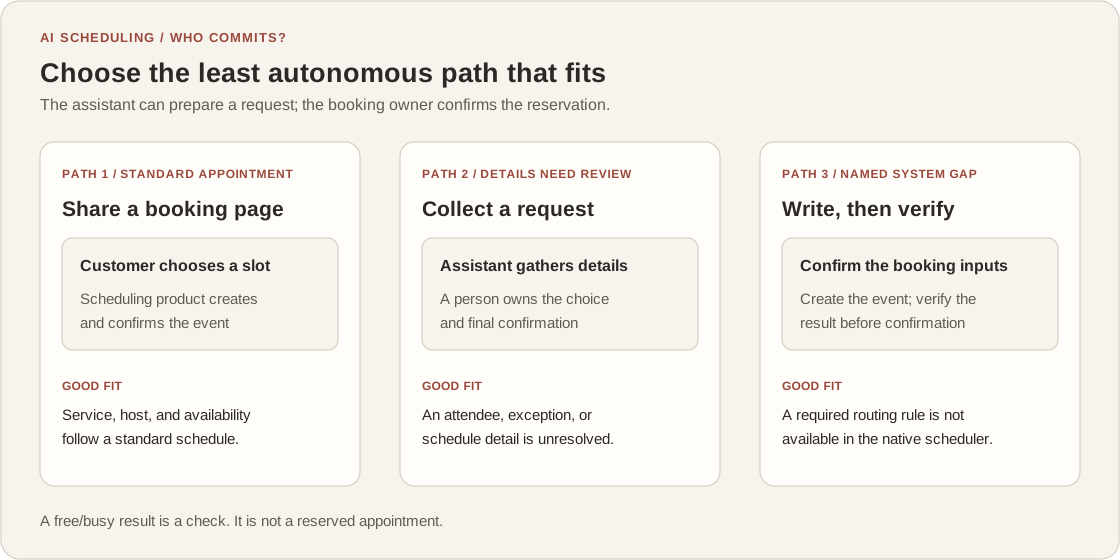
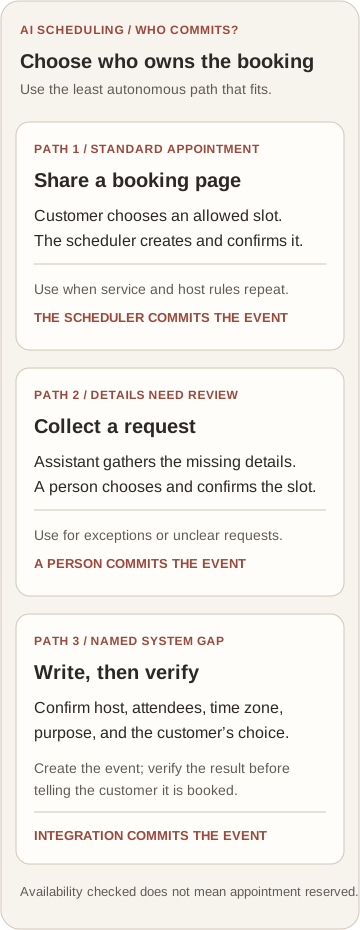
On a small screen, scroll the table to read every column.
| Path | Use it when | Minimum acceptance check |
|---|---|---|
| Booking page | The service, duration, host, and availability follow a standard schedule. | A sample booking checks the right calendars and confirms the selected time and host. |
| Request for review | The assistant still needs a person to choose an owner, resolve an exception, or confirm details. | The customer is told it is a request, not a booked meeting, until a person confirms. |
| Direct event write | A required CRM or routing rule cannot be expressed in the existing scheduler. | Confirm attendee, host, time zone, and purpose; verify event creation before saying it is booked. |
A booking page may already own routine appointments
Start with the calendar or scheduling product your team already uses. Google Calendar appointment schedules can define a duration, availability, a scheduling window, buffer time, and a daily booking limit. A booking page lets the customer choose among the times that the schedule presents, while the calendar creates the appointment.
That can be enough when one service maps to a clear host and predictable availability. Before adding an assistant that writes events, check whether the existing page can own the slot and send the confirmation. Account eligibility and options vary, so check the current documentation for the product and plan you use.
For a team schedule, verify which calendars the booking page checks. A schedule can list co-hosts without checking their availability by default. If that setting is missed, a polished booking page can still offer a time that conflicts with a co-host’s calendar.
Native schedules already cover common booking rules
Google Calendar documents appointment duration, availability, lead time, buffers, daily booking limits, and optional calendar checks. For a standard appointment, test those controls before building a second booking layer.
Google Calendar Help: Create an appointment schedule (checked October 11, 2026)Co-host availability needs an explicit check
Google says appointment schedules do not check co-host calendars by default. Select the calendars that matter and test a conflict before relying on the page for a team.
Google Calendar Help: Create an appointment schedule (checked October 11, 2026)Separate availability from event creation
A custom integration has two different jobs: ask which calendars are busy, then create an event on the chosen calendar. Google Calendar’s FreeBusy query returns busy intervals for specified calendars and a requested time window. Its event-insert endpoint is a separate authorized write with start and end times, and it can include attendees and notification settings.
That separation has a practical consequence: a free/busy response describes availability; it does not reserve the slot. This is an engineering inference from the separate read and write operations. If another booking or a policy change intervenes, the assistant needs a defined conflict response. Do not say “booked” until event creation succeeds, and test what a retry does before enabling the write.
Time zone, host, attendees, and the customer’s selected time are inputs to the decision. Do not silently infer them from a phrase such as “Thursday morning.” For a direct write, limit access to the calendars and actions the workflow needs, then show the confirmed time and next step to the customer.
FreeBusy returns intervals, not a booking
The Calendar API accepts a time range and time zone and returns busy intervals for the requested calendars. Treat that response as a check in the workflow, not as a committed appointment.
Google Calendar API: Freebusy query (checked October 11, 2026)Creating an event is an authorized write
The event-insert method creates an event and can add guests and send updates. A created event is not proof that every invitee accepted it, so the customer-facing message should describe only what the system confirmed.
Google Calendar API: Events insert (checked October 11, 2026)Walk through a hypothetical onboarding request
Consider a hypothetical software company whose assistant receives: “Set up onboarding for next week.” The company uses a standard 45-minute session with one onboarding specialist. The assistant can ask which product the customer uses, then share the specialist’s booking page. The customer chooses a time, and the calendar system owns the final reservation.
Now suppose the account’s region selects a specialist, a CRM record determines which onboarding path applies, and a second attendee must be included. The assistant should collect those details first. If the native scheduler can apply the routing and availability rules, keep using it. If not, route the request to a person or build a narrow integration that checks the required calendars and writes only after the customer confirms the proposed slot.
This example is hypothetical, not a client result. Its useful boundary is simple: a request is not a reservation, an availability lookup is not a reservation, and an event write should be confirmed before the assistant tells the customer the meeting is booked.
Test the booking boundary before enabling writes
Run the acceptance matrix with the people who own the schedule, CRM rules, and customer message. Include one ordinary request, one ambiguous time, one calendar conflict, and one failed or repeated write. The goal is to see who owns the final decision at every point, including when the happy path stops working.
The customer-engagement assistant in my selected work shows the kind of system where customer context and existing business processes meet. Before commissioning a new booking layer, write down one rule the current scheduler cannot express. If you want help deciding whether configuration or an integration fits, bring that example to a conversation.
- The customer confirms the service, attendees, proposed time, and time zone before a direct write.
- The system checks the calendars that the service owner says are required.
- The customer sees a booking confirmation only after the calendar returns a created event.
- A conflict or retry produces a safe next step and does not claim that an unconfirmed meeting exists.